Fox Digital Paper: Premium 12×12 Design Resources
If you’re designing invitations, crafting digital planners, building Canva templates, or producing branded social media assets, high-quality, ready-to-use design elements save hours—and elevate your output. Fox Digital Paper delivers exactly that: a tightly curated set of 12×12 digital papers and complementary clipart designed for real-world creative work—not just decoration, but functional, professional-grade visual infrastructure.
What Makes Fox Digital Paper Stand Out?
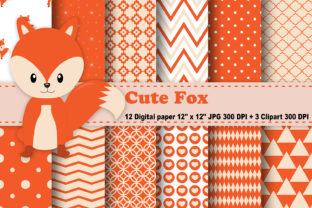
Fox Digital Paper isn’t generic stock texture. It’s a purpose-built collection—12 JPEG files, delivered in three zip folders, each sized precisely at 12 inches by 12 inches and rendered at true 300 DPI resolution. That means crisp, scalable output whether you’re printing a scrapbook page, exporting a PDF workbook, or layering into Procreate or Photoshop without pixelation or soft edges.
The papers themselves balance subtlety and impact. Think refined linen textures with gentle tonal variation—not flat grayscale repeats, but nuanced surfaces with organic depth. Some include faint watermark-style motifs (geometric, botanical, or minimalist line work), always understated enough to support layered text or graphics without competing for attention. No over-saturated gradients, no distracting noise—just intentional, versatile foundations.
Clipart That Works—Not Just Looks Nice
Alongside the papers, you receive three PNG clipart files—all with fully transparent backgrounds and scaled to fit comfortably within standard craft and design workflows. Each is sized so the tallest or widest point measures exactly 6 inches at 300 DPI, making them ideal for pairing with the 12×12 papers: think corner accents for planner headers, subtle icons for lesson plan dividers, or clean vector-style illustrations for digital course worksheets.
These aren’t clipart libraries full of cluttered bundles or mismatched styles. Each piece shares a consistent visual language—clean lines, balanced negative space, and thoughtful proportion. They’re built to integrate, not dominate. Use one as a focal point on a journal cover, or scatter scaled-down versions across a printable habit tracker. Their transparency means they drop seamlessly onto any paper background—no clipping masks, no guesswork.
Where Fox Digital Paper Fits Into Real Creative Workflows
Professionals don’t just “use” digital papers—they embed them into repeatable systems. A freelance educator might build a monthly curriculum bundle in Canva: using one Fox Digital Paper as the base for a printable reading log, another for a student feedback card, and the clipart to label sections clearly. The consistency across assets reinforces brand trust—even if it’s a personal teaching brand.
For small business owners launching digital products, Fox Digital Paper cuts production time dramatically. Instead of sourcing, resizing, and adjusting dozens of textures from multiple vendors, you start with 12 harmonized options. Pair them with the included clipart to create cohesive product suites—e.g., a matching set of Notion templates, printable goal planners, and Instagram story highlight covers—all unified by tone, scale, and resolution.
Hobbyists and crafters benefit too—but not just for printables. These papers translate beautifully into digital collage work in Affinity Designer or even as textured overlays in video editing (think subtle background layers behind talking-head footage). Because they’re 300 DPI and true 12×12, they scale cleanly down to mobile screen sizes without blur or artifacting.
Practical Considerations Before You Use Them
First: know your software. While JPEGs open universally, ensure your editing tool supports high-res imports without auto-resampling. In Canva, for example, upload as “Original size” and avoid dragging to resize—instead, use the “Resize” menu to maintain fidelity. In Adobe apps, place them as Smart Objects to preserve quality during transforms.
Second: consider layer hierarchy. Fox Digital Paper works best when treated as a foundational layer—not a topmost element. If you’re adding text, use semi-bold or bold weights with sufficient contrast (dark text on light papers, light text on deep tones). The subtle texture enhances legibility by breaking up flatness, but only if contrast stays strong.
Third: licensing clarity matters. These files are intended for both personal and commercial use—including resale in digital products you create (like editable PDF planners or template kits)—but they must be significantly modified or combined with other original elements. You can’t resell the JPEGs or PNGs as standalone assets. That’s standard for design resources like this—and smart practice for protecting your own creative IP, too.
Why Resolution and Consistency Matter More Than You Think
It’s easy to overlook DPI until you hit print. A 72 DPI file might look fine on screen—but when scaled to fit an 8.5×11 sheet, it blurs. At 300 DPI, Fox Digital Paper holds sharpness across formats: printed journals, large-format wall planners, or even SVG exports for Cricut projects where texture detail translates into cut-line fidelity.
And consistency isn’t just about aesthetics—it’s about efficiency. When all 12 papers share the same dimensions, resolution, and naming convention (e.g., Fox_Linen_01.jpg, Fox_Slate_02.jpg), your folder structure stays clean, your design handoff stays predictable, and your client revisions stay focused on content—not formatting surprises.
Getting Started—Fast, Focused, Effective
Unzip the three paper folders and the single clipart zip. Organize them in your asset library under “Fox Digital Paper” with subfolders labeled “Papers” and “Clipart.” Then pick one paper and one clipart piece—and build something small but complete: a single-page weekly meal planner, a mini ebook cover, or a branded email header.
Notice how quickly the texture adds sophistication without extra effort. See how the clipart anchors the layout—not as decoration, but as functional visual punctuation. That’s the value: Fox Digital Paper doesn’t ask you to reinvent your process. It fits inside it—and quietly raises the bar.
Final Thought: Tools Should Disappear
The best creative resources don’t draw attention to themselves. They recede into the work—supporting clarity, reinforcing voice, and freeing mental space for ideas instead of fixes. Fox Digital Paper does that. It’s not flashy. It’s not trend-chasing. It’s reliable, resolution-true, and thoughtfully restrained—so your message, your brand, and your audience remain front and center.