Lion Digital Paper: High-Res 12×12 Design Assets for Real Projects
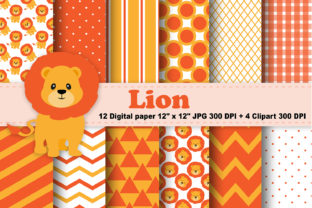
Whether you’re designing a client pitch deck, prepping printable lesson materials, building a branded social media template, or launching a small-batch product line, consistent, professional-looking visuals matter—not as decoration, but as functional tools. Lion Digital Paper delivers exactly that: a curated set of twelve high-resolution 12×12 digital papers, organized thoughtfully across three zip files, plus four versatile clipart elements in transparent PNG format. No subscriptions. No watermarks. Just ready-to-use, print-and-screen-ready assets designed to integrate smoothly into real-world creative workflows.
Why Resolution and Scale Matter—Especially for Hybrid Use
Many free or low-cost digital papers max out at 72dpi or come scaled for web-only use. That’s fine for mood boards—but not when you need crisp output for printed handouts, packaging mockups, or large-format presentations. Lion Digital Paper is built at true 300dpi, matching industry standards for professional printing. Each sheet measures exactly 12 inches by 12 inches at full resolution—ideal for scrapbooking layouts, planner inserts, custom stationery, or even fabric print tests. Because the files are JPEGs (not layered PSDs), they open instantly in any design app—from Canva and Affinity Designer to Adobe Photoshop and even Microsoft PowerPoint—and scale predictably without pixelation.
This consistency saves time during production phases where last-minute resizing often introduces blurriness or color shifts. For educators printing classroom posters, freelancers preparing client deliverables, or small business owners designing labels or greeting cards, knowing your background won’t degrade when exported or printed removes a common source of revision loops.
Patterns with Purpose—Not Just Pretty Textures
The twelve Lion Digital Paper patterns aren’t random repeats. They include subtle geometrics, soft organic motifs, muted tonal gradients, and restrained textures—all designed to support legibility and visual hierarchy. One pattern features a faint grid overlay (ideal for planners or worksheet backgrounds); another uses spaced dot clusters that recede behind bold typography without competing for attention. These aren’t “busy” backgrounds—they’re intentional surfaces that guide the eye, not distract from content.
Consider a blogger creating a downloadable checklist PDF: pairing clean black text with a low-contrast linen-textured Lion Digital Paper background adds tactile warmth while keeping readability intact. Or imagine a therapist designing intake forms—the gentle herringbone variant provides structure without clinical sterility. These patterns work because they’re calibrated for function first: contrast ratios meet accessibility guidelines, saturation stays within printable gamuts, and repeat tiles align cleanly at 12×12 boundaries.
Clipart That Integrates—Not Interrupts
The included four PNG clipart files (each sized up to 7×11 inches at 300dpi, with fully transparent backgrounds) complement the papers without redundancy. Think of them as modular accents—not standalone illustrations. One is a minimalist leaf cluster, another a clean-line arrow icon, a third a simple rounded frame, and the fourth a subtle swirl motif. Their scale means they can be resized down for icons or used at full size as focal points on presentation slides or cover designs.
Because they’re PNGs with transparency, they layer cleanly over any Lion Digital Paper background—no clipping masks or background erasing required. A marketer building an Instagram carousel can drop the arrow clipart onto a gradient paper to direct attention toward a CTA; a teacher adding the leaf cluster to a nature-themed worksheet reinforces theme without overwhelming young readers. Unlike oversized clipart packs filled with cartoonish or stylistically mismatched elements, these four were selected to harmonize with the paper palette—same DPI, same design ethos, same practical intent.
Who Benefits Most—and Why It Fits Their Workflow
Lion Digital Paper serves creators who value precision over quantity. Freelance designers juggling five clients appreciate having twelve reliable, cohesive backgrounds instead of sifting through hundreds of inconsistent options. Educators building printable resources benefit from the uniform 12×12 sizing—it maps directly to standard paper trim sizes and cuts cleanly on home printers. Small business owners launching physical products (like journals or gift tags) find the 300dpi output eliminates costly prepress corrections.
It’s also well-suited for hybrid users—those who move fluidly between screen and print. Bloggers drafting lead magnets, podcasters designing show notes templates, or nonprofit staff preparing donor reports all need assets that look polished in both PDF and printed form. Lion Digital Paper bridges that gap without requiring separate web and print versions.
Realistic Fit Considerations
Lion Digital Paper isn’t meant to replace comprehensive design systems or subscription-based asset libraries. If you need hundreds of seasonal themes, animated SVGs, or editable vector patterns, this set won’t expand to meet those needs. It’s intentionally focused: twelve thoughtfully crafted papers + four supporting clipart elements, delivered as straightforward JPEGs and PNGs.
Also note the file organization: the papers are split across three zip files—not randomly, but likely by visual family (e.g., neutrals, textures, tonal patterns). This helps users preview and select efficiently, though it does require extracting multiple archives. The clipart lives in its own zip, keeping assets modular and easy to locate later.
If you frequently collaborate with others using different software (e.g., non-designers editing in Google Docs), remember that JPEGs and PNGs embed reliably—but won’t retain editable layers or vector scalability. That’s a trade-off for universal compatibility, not a limitation.
Getting Started Without Overhead
No installation. No account setup. Once downloaded, the files sit locally—ready to drag into Canva, paste into Illustrator, or import into Procreate. Because each paper is a single-layer JPEG, there’s no risk of missing fonts or broken links. For users managing tight deadlines or working offline (like educators in low-bandwidth schools or creatives traveling), that reliability matters more than flashy features.
A practical tip: rename files meaningfully before unzipping—e.g., lion-paper-linen-soft or lion-clipart-arrow-bold. That small habit pays off when searching across dozens of projects months later. And because all assets share the same DPI and base dimensions, mixing and matching across files stays predictable—no surprise scaling jumps or alignment mismatches.
When Simplicity Supports Better Outcomes
In a landscape saturated with bloated toolkits and feature-heavy platforms, Lion Digital Paper stands out by doing one thing exceptionally well: delivering production-ready, visually coherent surface assets that behave consistently across contexts. It doesn’t try to be a design suite. It doesn’t offer AI-generated variations. Instead, it gives you twelve dependable starting points—and four smartly scaled accents—to build from.
That focus translates directly into outcomes: faster mockup iterations, fewer client revisions tied to background choices, more confident printing decisions, and stronger visual continuity across branded materials. Whether you’re sketching ideas on paper or refining pixels on screen, Lion Digital Paper supports the work—not the other way around.