Magical Unicorn Papers
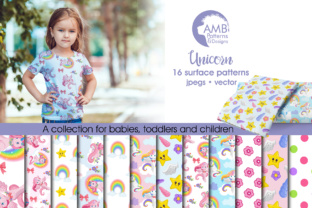
Magical Unicorn Papers isn’t just another digital pattern pack—it’s a versatile, ready-to-use creative toolkit designed for makers who value quality, consistency, and joyful execution. At its core, it delivers 16 original, hand-crafted digital papers—each a seamless, high-resolution (300 dpi) 12" × 12" JPEG—featuring soft, nursery-appropriate palettes: gentle pinks, calming blues, and warm pale yellows. These aren’t stock repeats or AI-generated motifs. Every unicorn, star, cloud, and rainbow element was drawn in-house using original clipart and thoughtful composition—ensuring cohesion across all 16 patterns while preserving distinct character in each.
Why these papers stand out for real-world use
Many digital paper sets sacrifice usability for aesthetics—overly busy, low-res, or inconsistent in tone. Magical Unicorn Papers avoids that trap. The palette is intentionally muted and harmonized, making it ideal for baby showers, gender-neutral nurseries, early childhood classrooms, or boutique branding where sweetness shouldn’t tip into cloying. Each design balances whimsy with restraint: unicorns appear playful but not cartoonish; rainbows are soft-edged and subtle, not neon-bright. That balance means your printed cupcake toppers won’t clash with pastel linens—and your fabric-printed onesies will hold up beautifully after multiple washes.
Creative applications—beyond the obvious
You’ll likely reach first for party decorations, invitations, or scrapbooking—but the real value of Magical Unicorn Papers emerges when you stretch its utility across formats and audiences:
- Small business owners can use the papers as background textures for product labels, packaging inserts, or printable thank-you cards—especially effective for eco-friendly baby brands or handmade toy shops seeking cohesive, on-brand visuals without custom illustration costs.
- Educators and childcare providers print select patterns at scale for classroom banners, name tags, or visual schedules—pairing the familiar unicorn motif with calm color psychology to support emotional regulation and engagement in early learners.
- Freelance designers layer the papers as base textures in Canva or Adobe Illustrator to build custom invitation suites, then export individual elements (like a single unicorn icon from the pattern) as PNGs for social media assets—maintaining brand continuity across digital and physical touchpoints.
- Hobbyists and crafters apply the papers directly to Cricut or Silhouette software for precise cutting—think scalloped favour tags, die-cut gift wrap accents, or iron-on transfers for organic cotton baby bodysuits. Because every file is 300 dpi and 12×12 inches, scaling down preserves crispness—even at 2” × 2” for button badges.
How to keep results clear and audience-aligned
Clarity starts with intention—not decoration. Before selecting a pattern, ask: What emotion or message does this piece need to convey? A pale yellow paper with tiny gold stars reads “gentle celebration”—ideal for a quiet baby sprinkle. A soft pink paper with layered clouds and floating unicorns supports nurturing themes—perfect for a newborn photo album or lactation consultant’s handouts. Avoid mixing more than two patterns per project unless there’s a deliberate hierarchy (e.g., one dominant background + one accent border). Consistency in color temperature matters: stick within the provided palette rather than adding external brights, which dilutes the set’s cohesive warmth.
Realistic project ideas—tested and practical
Here are three no-fluff, production-ready uses—each grounded in actual creator feedback and technical feasibility:
- Nursery wall art series: Print four different papers on matte cardstock, trim to 8" × 10", mount on foam board, and frame in white wood. No extra design work needed—the patterns themselves become curated art. Bonus: they photograph well against light gray or beige walls.
- Print-on-demand baby onesies: Upload a single pattern to platforms like Printful or Gelato using their fabric template. Choose a lightweight cotton jersey—light pinks and pale yellows reproduce faithfully, and the 300 dpi resolution prevents pixelation even on curved seams.
- Digital planner stickers: Open any JPEG in Photoshop or Affinity Photo, use the Magic Wand tool to isolate a unicorn or rainbow, and save as transparent PNG. Resize to 0.5–1.25 inches for Notion or GoodNotes sticker packs—no licensing concerns, since you own full commercial rights to AMB-1384.
Adapting for different platforms and constraints
If you’re designing for Instagram Stories, resize one pattern to 1080 × 1920 px and overlay a clean sans-serif quote (“Little dreams, big magic”)—the soft background ensures text remains legible without heavy outlines. For Etsy listings, use the same paper as your main product image background—then add a subtle drop shadow in Canva to lift your physical item (e.g., a printed invitation) off the surface. And if you’re prepping files for a local print shop? Confirm they accept JPEGs at 300 dpi—most do—and name files clearly (e.g., AMB-1384_PinkUnicorn_12x12.jpg) to avoid mix-ups during batch printing.
Magical Unicorn Papers works because it respects your time and your standards. It doesn’t ask you to “get inspired”—it gives you a reliable starting point, calibrated for real output. Whether you’re prototyping a new product line, assembling a client’s launch kit, or crafting something heartfelt for a loved one, these papers reduce friction without sacrificing charm. They’re not magic—they’re thoughtful, usable, and quietly capable.