Retro Flowers Digital Paper
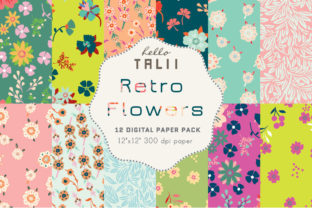
Imagine opening a design project and instantly having twelve cohesive, high-resolution vintage floral patterns at your fingertips—each one carefully curated in authentic retro palettes: soft pink, vibrant teal, bold fuchsia, earthy green, crisp apple green, deep dark blue, rich red, warm brown, and muted beige. That’s the practical advantage of this Retro Flowers Digital Paper set—not just aesthetics, but intentionality built into every pixel.
Why Vintage Florals Still Matter in Modern Design
Vintage floral motifs carry emotional resonance that feels both nostalgic and refreshingly distinct from today’s minimalist or hyper-digital trends. They communicate warmth, craftsmanship, and timelessness—qualities especially valuable when building brand identity, creating educational materials, or designing physical products like stationery or packaging. Unlike generic clipart or overused stock textures, these 12 patterns were developed with consistency in mind: same scale (12×12 inches), identical resolution (300 dpi), and uniform pixel dimensions (3600×3600 px). That means no resizing headaches, no quality loss when printed, and seamless layering across projects.
Real-World Uses That Save Time and Elevate Output
A freelance graphic designer preparing a client pitch for a boutique bakery might use the fuchsia-and-teal floral paper as a background for a mood board—then repurpose the same pattern as a subtle overlay on product labels. An educator creating printable lesson plans can apply the beige-and-brown floral tile to headers and dividers, giving handouts visual rhythm without distracting from content. A small business owner launching a handmade candle line may print the apple green and dark blue papers directly onto gift tags or packaging inserts—knowing colors will stay true from screen to press.
Because each file is a JPG (not a layered PSD or vector), they’re universally compatible with Canva, Adobe Photoshop, Affinity Designer, Procreate, and even Microsoft PowerPoint. No plugin required. No conversion step. Just drag, drop, and adjust opacity or blending mode as needed.
Who Benefits Most—and Why It Fits Their Workflow
Creatives who juggle multiple platforms appreciate that these files work equally well for digital presentations and physical outputs. Bloggers adding visual interest to Pinterest pins or Instagram story templates find the consistent size and resolution eliminates guesswork. Marketers building branded email templates use the retro color palette to reinforce a specific era-inspired campaign—say, a 1970s-themed product launch—without needing custom illustration.
Small business owners and solopreneurs often lack in-house design support. With Retro Flowers Digital Paper, they gain professional-grade texture options without hiring a designer for every variation. One user reported cutting down her product mockup creation time by nearly 40% after switching from free-but-inconsistent online resources to this curated set.
Educators and curriculum developers rely on visual consistency to reduce cognitive load for learners. Using the same floral motif across worksheets, slide decks, and classroom posters helps students recognize thematic connections—even subconsciously. The brown-and-beige option, for example, pairs naturally with kraft paper textures and works especially well for history or literature units focused on mid-century American culture.
Thoughtful Considerations Before You Use Them
While versatile, these papers are best suited for applications where subtlety or moderate contrast supports—not competes with—foreground content. For dense text blocks or data-heavy infographics, consider using them as borders, section dividers, or background accents rather than full-page fills. Also, because they’re JPEGs, they don’t support transparency. If you need overlays with drop shadows or cut-out elements, you’ll need to add those separately in your editing software.
The retro color palette intentionally avoids neon brightness or ultra-saturated tones. That makes it ideal for calming, sophisticated, or heritage-focused projects—but less suitable for high-energy youth branding or tech startups aiming for futuristic contrast. If your brand guidelines require Pantone-matched accuracy, verify color output on your calibrated monitor and test-print before final production.
How to Maximize Value Across Projects
Start by identifying one recurring design need: maybe it’s social media cover images, printable planners, or presentation slide backgrounds. Apply one pattern consistently there first—notice how repetition builds recognition. Then expand gradually: try rotating through three or four favorites based on seasonal themes (e.g., pink and apple green for spring; deep red and brown for autumn).
For print projects, always export final files at full 3600×3600 px resolution and confirm your printer accepts JPGs at 300 dpi. Most commercial printers do—but some web-based services default to lower resolutions unless explicitly instructed. When using in Canva, upload each file individually and select “Original Size” to preserve fidelity.
Another underused tactic: combine two patterns using blending modes like Multiply or Overlay in Photoshop or Affinity. Layering the teal floral over the beige one creates depth and complexity without muddying the palette—a technique commonly used in editorial design for magazine spreads or book chapter openers.
A Resource That Grows With Your Needs
This isn’t just a static collection—it’s a flexible foundation. Because all 12 patterns share the same grid structure and repeat logic, they can be tiled seamlessly beyond 12×12 inches. Need a larger background for a trade show banner? Tile the pink floral horizontally and vertically in your layout software. Want to create custom wrapping paper? Repeat the dark blue pattern in Illustrator with no visible seams.
And unlike subscription-based asset libraries, this set requires no ongoing fees or logins. Once downloaded, it lives securely in your local library—ready whenever inspiration strikes, regardless of internet access or platform updates.
Final Thoughts for Intentional Designers
Good digital paper does more than fill space—it sets tone, reinforces message, and quietly supports clarity. The Retro Flowers Digital Paper set delivers that balance: distinctive enough to stand out, cohesive enough to unify, and technically reliable enough to trust across formats. Whether you're crafting a heartfelt wedding invitation, developing a new course module, or refreshing your brand’s visual language, these 12 vintage floral patterns offer grounded, thoughtful starting points—not shortcuts, but smart foundations.
If you frequently reach for floral elements but hesitate over color harmony or scalability, this set removes those friction points. It won’t replace strategic thinking—but it does remove unnecessary barriers between idea and execution.