Burger Digital Paper: Creative Fuel for Designers, Crafters, and Small Businesses
Whether you're designing custom greeting cards, building a cohesive brand identity, or crafting printable planners for your Etsy shop, the right digital paper can make all the difference. Burger Digital Paper is a thoughtfully curated collection designed not just for aesthetics—but for real-world usability across creative workflows.
What Exactly Is Burger Digital Paper?
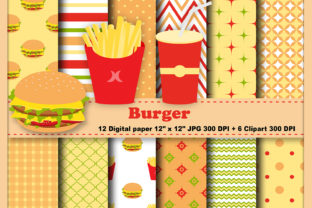
Burger Digital Paper isn’t a single sheet—it’s a versatile toolkit of 12 high-resolution, ready-to-use JPEG digital papers delivered in three organized ZIP files. Each paper measures a standard 12 x 12 inches and renders at 300 DPI—ensuring crisp, professional-quality output whether printed on home inkjet printers or sent to commercial print services.
Unlike generic pattern libraries, Burger Digital Paper emphasizes texture, balance, and subtle visual rhythm. Think soft grain overlays, gentle tonal shifts, and layered color palettes that feel tactile—even on screen. These aren’t flashy gradients or over-saturated motifs; they’re grounded, adaptable backgrounds built for layering, cropping, and scaling without losing integrity.
Why Resolution and Size Matter (More Than You Might Think)
At first glance, “12 x 12 at 300 DPI” may sound like technical fine print—but it’s foundational to practical performance. A 300 DPI resolution means every inch contains 300 pixels of detail. That density prevents pixelation when you zoom in to edit, resize elements, or print at larger formats (like posters or wall art). It also ensures clean edges when cutting with digital die-cutting machines like Cricut or Silhouette.
The consistent 12 x 12 sheet size aligns with industry standards for scrapbooking, planner inserts, and printable templates. Whether you’re using Canva, Adobe Photoshop, or Affinity Designer, these dimensions slot seamlessly into common canvas presets—no guesswork, no cropping compromises.
Clipart That Complements—Not Competes
Complementing the 12 digital papers are six hand-selected PNG clipart files, delivered in a separate ZIP archive. Each features a transparent background and max dimensions of 6 x 11 inches—designed to scale gracefully without distortion.
These aren’t cluttered illustrations or overly stylized icons. Instead, they offer clean, confident shapes: a minimalist cheeseburger icon, a retro soda cup, a stacked fry box, a ketchup bottle silhouette, and two food-themed decorative elements (a dashed border frame and a playful “bite mark” accent). All rendered at 300 DPI, they retain clarity even when enlarged to fill half a page—or reduced to tiny embellishments in corner details.
Because they’re PNGs with transparency, you can drop them directly onto any Burger Digital Paper background without white boxes or alignment headaches. No need to mask, erase, or reposition—just drag, resize, and go.
Real-World Use Cases: Where Burger Digital Paper Fits In
- Small Business Owners: Create branded packaging inserts, menu backgrounds, or social media story templates—without hiring a designer. Pair a warm mustard-toned paper with the ketchup bottle clipart for a cohesive café aesthetic.
- Etsy Sellers: Bundle printable meal planners, recipe cards, or kids’ activity sheets. The neutral yet expressive tones in Burger Digital Paper lend themselves well to both playful and sophisticated niches.
- Educators & Homeschoolers: Design engaging flashcards, themed worksheets, or classroom reward charts. The subtle textures reduce visual fatigue while still feeling inviting.
- Digital Planners & Notetakers: Import papers as cover pages or section dividers in GoodNotes or Notability. Their balanced contrast supports readability without overwhelming handwritten notes.
- Print-on-Demand Creators: Use the papers as base layers for t-shirt mockups, mug designs, or sticker sheets—especially when paired with the scalable clipart for focal points.
Strengths You’ll Notice Right Away
Adaptability is the quiet superpower of Burger Digital Paper. Its muted saturation and restrained contrast mean it works equally well with bold typography or delicate line art. It doesn’t shout—so your content does.
Consistency across files matters too. While each of the 12 papers has its own character—some lean earthy, others softly modern—they share a unified color language and textural sensibility. That cohesion saves time during design sprints and builds trust in your visual brand.
File organization is another understated strength. Splitting the papers across three ZIP files (rather than dumping everything into one bloated archive) makes browsing intuitive—especially if you’re working from a tablet or low-storage device.
What to Keep in Mind: Practical Considerations
Burger Digital Paper is intentionally JPEG-based—not layered PSDs or editable vectors. That means it’s optimized for immediate use, not deep customization. If you need to recolor individual pattern elements or tweak repeat tiles, this set won’t support that level of control.
Similarly, the included clipart is purpose-built—not an exhaustive library. There are no alternate poses, seasonal variants, or animated versions. But that focus is intentional: fewer, higher-quality assets mean less decision fatigue and faster execution.
Also worth noting: while all files are 300 DPI, final print quality still depends on your printer’s calibration, paper stock, and ink type. For best results, pair Burger Digital Paper with matte or semi-gloss cardstock—avoid glossy photo paper unless you want extra sheen on already-rich tones.
How to Evaluate If This Set Fits Your Needs
Ask yourself three questions before downloading or purchasing:
- Do I need ready-to-print, no-fuss backgrounds? If yes—and you value consistency over infinite variation—Burger Digital Paper delivers efficiently.
- Am I layering text, photos, or other graphics on top? The papers’ balanced contrast and texture provide natural depth without competing for attention.
- Do I work across multiple platforms? Since these are universal JPEG and PNG files, they open in virtually any design tool—from free options like Photopea to premium suites like Illustrator or Procreate (with compatible import plugins).
If two or more answers are “yes,” this collection likely aligns with how you actually work—not how design tutorials assume you should.
Getting Started: Simple Ways to Use Burger Digital Paper Today
You don’t need advanced skills to begin. Try these beginner-friendly actions:
- In Canva: Upload one JPEG as a background, add your text, then insert a PNG clipart file as an overlay. Adjust transparency to 80–90% for a soft, integrated look.
- In PowerPoint or Google Slides: Set a Burger Digital Paper as your slide master background. Use the clipart as custom bullet points or section headers.
- For physical crafts: Print a paper at full 12x12 size on sticker paper, then cut out shapes using the clipart as stencils—or print clipart separately and decoupage them onto handmade journals.
And remember: you’re not locked into using all 12 papers at once. Start with two or three that match your current project’s mood—warm neutrals for cozy branding, cooler tones for modern minimalism—and build from there.
Final Thought: Tools Should Serve Your Vision—Not Define It
Burger Digital Paper succeeds because it respects your time, your taste, and your goals. It doesn’t try to be everything. Instead, it offers a tight, intentional selection—designed to integrate quietly into your process while elevating the final result.
Whether you’re launching a food blog, prepping lesson plans, or prototyping product packaging, these papers and clipart serve as reliable foundations—not distractions. They’re the kind of resource you download once, use often, and forget you ever had to search for.