Halloween Pumpkin Digital Paper & Patterns: A Creative Resource Guide for Crafters, Designers, and Educators
What Are Halloween Pumpkin Digital Papers?
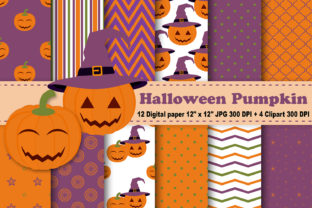
Halloween Pumpkin Digital Papers are high-resolution, printable design assets created specifically for seasonal crafting, digital scrapbooking, card making, and classroom projects. Unlike physical patterned paper you’d buy at a craft store, these are digital files—meaning they’re downloaded instantly and used on-screen or printed at home or via professional print services. Each paper features festive pumpkin-themed motifs—think jack-o’-lanterns, vine textures, spooky silhouettes, and autumnal color palettes—all arranged in seamless, repeatable patterns ideal for backgrounds, borders, and layered designs.
Why 12×12 Inches and 300 DPI Matter
The included set contains 12 JPEG digital papers, each sized precisely at 12 x 12 inches—the industry standard for digital scrapbooking and papercraft templates. This size ensures compatibility with most cutting machines (like Cricut and Silhouette), graphic design software (Adobe Photoshop, Canva, Affinity Designer), and printable craft kits. More importantly, every paper is rendered at 300 DPI (dots per inch), guaranteeing crisp, professional-grade output whether you're printing invitations on matte cardstock or scaling elements for large-format wall decor. Low-resolution files often pixelate or blur when enlarged—these won’t.
How the 3 Zip Files Are Organized (and Why It Helps You Work Smarter)
This collection is delivered across three thoughtfully organized ZIP files:
- Zip File #1: 4 Halloween pumpkin digital papers with bold, modern linocut-style pumpkins and deep orange/black contrast.
- Zip File #2: 4 more papers featuring subtle watercolor textures, hand-drawn vines, and muted harvest tones—perfect for elegant or vintage-themed projects.
- Zip File #3: 4 additional papers with playful, kid-friendly motifs—smiling pumpkins, candy corn accents, and whimsical polka-dot backgrounds.
This segmentation isn’t just about convenience—it reflects real-world creative workflows. For example, educators designing Halloween literacy centers may prefer the friendly, high-contrast designs from Zip #3, while wedding stationers curating “autumn nuptials” might reach first for the refined watercolor papers in Zip #2. Organization by visual tone saves time and supports intentional design decisions.
Meet the Clipart: 4 PNG Files with Transparent Backgrounds
Beyond the papers, you’ll receive a separate ZIP containing 4 premium PNG clipart files, all sized up to 8×11 inches at their widest/tallest point and saved at 300 DPI. These aren’t generic stock graphics—they’re custom-drawn, Halloween-specific elements designed to layer seamlessly over your digital papers:
- A grinning, candlelit jack-o’-lantern with fine carving details
- A cluster of three mini pumpkins tied with twine and dried leaves
- A stylized “Happy Halloween” banner in retro serif font
- A pair of floating black cats framed by swirling vines
Because each file uses a transparent background, you can drag-and-drop them into Canva, PowerPoint, or Procreate without white boxes or awkward edges. No more tedious erasing or masking—just instant, professional compositing.
Real-World Uses: From Classroom to Commerce
Digital papers and clipart aren’t just for hobbyists. Their versatility bridges education, entrepreneurship, and everyday creativity:
Educators & Homeschoolers
Teachers use these resources to create no-prep Halloween worksheets, interactive bulletin board sets, editable name tags, and themed reading logs. The 12×12 size allows easy resizing into flashcards (3×4 inches) or full-page posters—without quality loss. Bonus: the transparent clipart lets students digitally “decorate” their own stories or science reports about plant life cycles (yes—pumpkins count!).
Small Business Owners & Makers
Stationery designers, Etsy sellers, and local gift shop owners leverage these files to produce on-brand products fast: printable party invites, custom stickers, sublimation-ready pillow templates, and even SVG-compatible cut files (when traced in vector software). Because all assets are commercial-use licensed (check your license terms), you can confidently sell items made with them—no attribution required.
Families & DIY Enthusiasts
Hosting a neighborhood trunk-or-treat? Print the vine-textured papers as table runners and layer the jack-o’-lantern clipart onto photo mats for a cohesive look. Planning a pumpkin-carving party? Use the bold linocut papers as carving guides—print them on transparency film and tape directly onto pumpkins for precision stenciling.
Debunking Common Misconceptions
Many beginners assume digital papers are only for “serious designers”—but that’s outdated. Today’s tools make them accessible to everyone:
- Myth: “I need Adobe Illustrator to use these.”
Truth: Free tools like Canva, GIMP, or even Microsoft PowerPoint handle JPEGs and PNGs flawlessly—even for basic resizing, cropping, and layering. - Myth: “Digital papers are just for printing.”
Truth: They’re equally powerful in digital spaces—think Zoom virtual backgrounds, Canva social media posts, or Google Slides presentations for school assemblies. - Myth: “All Halloween clipart looks cheap or cartoonish.”
Truth: These 4 PNGs were crafted with stylistic range in mind—balancing charm and sophistication so they suit preschool crafts and boutique branding alike.
Getting Started: A Simple 3-Step Workflow
You don’t need advanced skills to begin. Try this beginner-friendly process:
- Download & Unzip: Save all three ZIP folders to one location (e.g., “Halloween_Digital_Kit”).
- Preview & Choose: Open one JPEG paper in any image viewer. Notice how the pattern repeats cleanly—ideal for tiling in Canva or Photoshop. Then open a PNG clipart file to see its transparent edges.
- Create & Export: In Canva, upload a paper as your background, add a clipart element, adjust size/opacity, then download as PDF (for print) or PNG (for web).
Why Quality Resolution and Thoughtful Sizing Build Trust—and Better Results
In today’s fast-paced digital landscape, users value clarity, reliability, and ease. That’s why this kit prioritizes 300 DPI resolution and standardized 12×12 sheet sizing: it eliminates guesswork and technical friction. When your printed invitation looks sharp—not fuzzy—and your social post loads quickly without blurring, you communicate professionalism and care. That builds trust with students, customers, or collaborators before a single word is read.
Final Thoughts: More Than Just a Download—It’s Creative Confidence
Halloween Pumpkin Digital Paper and Patterns with Clipart isn’t just another holiday download. It’s a toolkit designed to reduce creative overwhelm and amplify expression. Whether you’re a teacher preparing for October learning stations, a small business owner launching seasonal merchandise, or a parent crafting memories with your kids—these assets meet you where you are. They honor your time, respect your skill level, and empower you to make something meaningful, beautiful, and authentically *yours*.
With 12 versatile papers and 4 carefully crafted, transparent PNGs—all optimized for real-world use—you’re not just getting files. You’re getting permission to play, experiment, and celebrate Halloween with intention, joy, and zero technical stress.